Artwork: Shoes by Vincent van Gogh. The Metropolitan Museum of Art · Public domain
Wiring ONNX Runtime GenAI into a LangChain RAG Pipeline
AI disclosure: This article was moderated by AI.
Part one selected ONNX Runtime GenAI as the inference engine for an offline, Windows-based RAG system. The next step is to expose that engine to LangChain and build the optimized model it will run.
Why a custom LLM wrapper
LangChain RAG chains expect an LLM that implements BaseLLM or BaseChatModel. ONNX Runtime
GenAI instead provides a Generator API. A thin adapter bridges the interfaces, owns the tokenizer
and model, and implements _generate.
def _generate(self, prompts, stop=None, run_manager=None, **kwargs):
    from onnxruntime_genai import GeneratorParams, Generator

    text_generations: list[str] = []
    answer: str = ""

    # Encode the batch of prompts with the model's tokenizer.
    input_token = self.tokenizer.encode_batch(prompts)

    model_params = self._default_params
    model_params.update(self.model_kwargs)

    # Build generator params (temperature, max_length, top_p, etc.).
    params = GeneratorParams(self.model)
    params.set_search_options(**model_params)
    generator = Generator(self.model, params)

    generator.append_tokens(input_token)
    while not generator.is_done():
        generator.generate_next_token()
        new_token = generator.get_next_tokens()[0]
        answer += self.tokenizer.decode(new_token)

        # Stream to stdout as tokens arrive.
        print(self.tokenizer_stream.decode(new_token), end="", flush=True)

    text_generations.append(answer)
    del generator

    return LLMResult(
        generations=[[Generation(text=text) for text in text_generations]]
    )
Three details in the adapter affect how it behaves in production:
- The
while not generator.is_done()loop exposes each token as it is produced. That supports UI streaming and per-token latency logging. - Deleting the generator between calls keeps GPU memory flat over the lifetime of a long-running server. This matters when the service is limited to one on-premises machine.
set_search_optionsacceptsmax_length,temperature, andtop_p, so the same wrapper can use greedy decoding for extraction and sampled decoding for summarization.
The rest of the RAG chain uses standard LangChain components: a retriever, prompt template, and guardrails. The chain does not need to know which inference engine sits behind the adapter.
The class around _generate
_generate is the hot path, but LangChain also requires _llm_type, default search options, and a
model and tokenizer loaded during construction:
from onnxruntime_genai import Model, Tokenizer
from langchain_core.language_models.llms import BaseLLM

class OnnxRuntimeGenAILLM(BaseLLM):
    model_path: str
    model_kwargs: dict = {}

    def __init__(self, model_path: str, **kwargs):
        super().__init__(model_path=model_path, **kwargs)
        self.model = Model(model_path)              # loaded once, reused per request
        self.tokenizer = Tokenizer(self.model)
        self.tokenizer_stream = self.tokenizer.create_stream()

    @property
    def _llm_type(self) -> str:
        return "onnxruntime-genai"

    @property
    def _default_params(self) -> dict:
        # Greedy by default; override per call for sampled decoding.
        return {"max_length": 512, "temperature": 0.0, "top_p": 1.0}
Loading Model and Tokenizer once at startup keeps first-token latency flat. They are not loaded
again for each request, and everything needed for generation is already resident on the GPU.
Building the optimized ONNX model
The throughput measured in part one depends on an optimized graph rather than a naive export. ONNX Runtime GenAI includes a model builder that fuses operators and applies the optimizations required by Phi-3:
onnxruntime-genai.builder --model phi-3-mini --output ./phi3_optimized.onnxWe run the builder once as a conversion job and ship its artifact with the application. The target environment is air-gapped, so the optimized model must be part of the deployment package. Runtime model downloads are not available.
The builder emits the quantized weights and tokenizer as well as the .onnx file. It also writes
genai_config.json, which describes the graph and default search options:
phi3_optimized/
├── model.onnx              # optimized, fused graph
├── model.onnx.data         # INT4 block-quantized weights
├── genai_config.json       # EP config + default search options
└── tokenizer.json
The two most important settings are precision and execution provider. We use int4 to reduce
bandwidth and cuda on the A100. Those settings produced the throughput and latency reported in
part one.
Assembling the RAG chain
Once the LLM is wrapped, the chain uses the familiar LangChain composition model:
llm = OnnxRuntimeGenAILLM(model_path="./phi3_optimized")
retriever = local_vector_store.as_retriever(search_kwargs={"k": 4})

prompt = ChatPromptTemplate.from_template(
    "Answer using only the context.\n\nContext:\n{context}\n\nQuestion: {question}"
)

rag_chain = (
    {"context": retriever | format_docs, "question": RunnablePassthrough()}
    | prompt
    | llm            # the ONNX Runtime GenAI wrapper
    | guardrails     # validate before returning
)
Putting the pipeline together
On the Windows machine, the end-to-end flow has five steps:
- Load the optimized Phi-3 ONNX model and tokenizer once at startup.
- Retrieve context from the local vector store for the user’s query.
- Compose the prompt with that context through a LangChain prompt template.
- Generate through the custom
BaseLLMand stream tokens as they arrive. - Apply guardrails before returning the output.
With the optimized model and the wrapper above, the full pipeline stayed under the 5-second budget even when retrieved context increased the prompt length. That was the target set at the start of the series.
For a typical query with approximately 256 tokens of retrieved context and a 256-token answer, the latency budget breaks down as follows:
| Stage | Budget | Notes |
|---|---|---|
Vector retrieval (k=4) | ~0.1s | Local FAISS/Chroma, no network |
| Prompt assembly | <0.05s | Template + format_docs |
| Generation (256 tokens) | ~2.0s | Dominated by decoding; ~134 tps |
| Guardrails validation | ~0.2s | Output checks before return |
| Total | < 2.5s | Comfortably under the 5s ceiling |
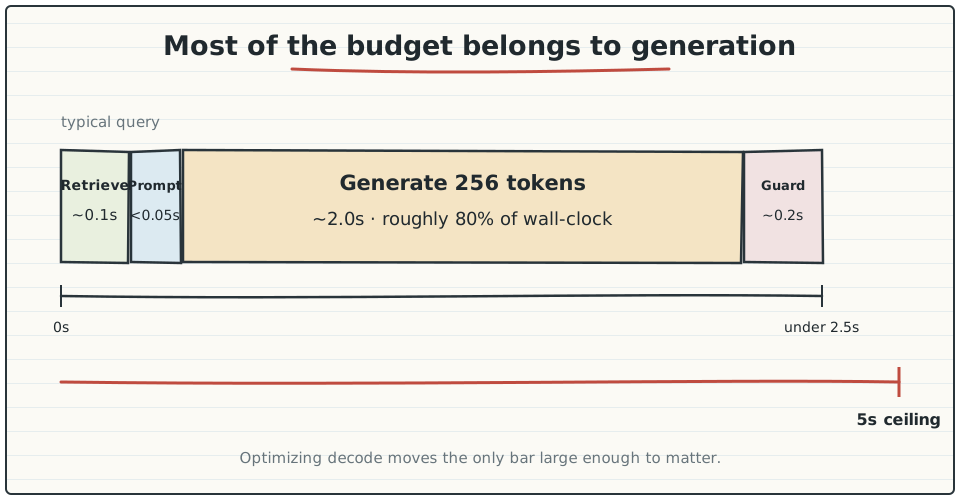
Generation accounts for approximately 80% of wall-clock time. A 20% reduction in decode throughput therefore leaves much less room in the total budget, which is why the engine choice in part one matters.
Deployment conclusions
The adapter needs approximately 40 lines to present ONNX Runtime GenAI as a LangChain LLM. The
deployment should build its optimized graph with onnxruntime-genai.builder, because a raw export
leaves most of the available performance unused. In an air-gapped environment, the optimized model
is a build artifact and ships with the application.