
Artwork: Man in a Turban by Rembrandt. The Metropolitan Museum of Art · Public domain
Choosing an On-Prem SLM Inference Engine for Windows
AI disclosure: This article was moderated by AI.
For a Retrieval-Augmented Generation (RAG) system running offline on Windows, the inference engine determines whether the latency budget is realistic. We evaluated ONNX Runtime GenAI, LlamaCPP, Hugging Face Optimum, and Triton. ONNX Runtime GenAI delivered the best token throughput, latency, and wall-clock efficiency for our scenario. This first part of the series covers how we evaluated the engines and what we measured.
The constraints
The system combined LangChain, an SLM, and guardrails. It also had to meet four hard requirements in an air-gapped Windows environment:
- All computation had to stay local, with no cloud calls.
- Runtime could not require an internet connection.
- End-to-end inference had to finish in under 5 seconds.
- Deployment had to run efficiently on on-premises Windows hardware.
The target machine did not support Docker, which ruled out Triton. A Windows-first deployment also made an engine that required extensive custom builds, such as LlamaCPP, expensive to maintain.
The candidates
| Engine | Why we considered it | Dealbreaker for us |
|---|---|---|
| ONNX Runtime GenAI | First-class ONNX + Phi-3 support, Windows binaries | — |
| LlamaCPP | Fast, portable GGUF inference | Needs custom builds on Windows |
| Hugging Face Optimum | Familiar HF ergonomics | Limited graph optimization; no Phi-3 |
| Triton | Great serving throughput | Requires Docker; blocked on-prem |
We used Microsoft’s Phi-3 Mini 4k Instruct ONNX model on an Azure ND96amsr_A100_v4 instance
with 1× A100 80GB. The benchmark fixed generation length at 256 tokens and ran 5 warmups followed
by 10 repetitions. The driver was the benchmark script included with onnxruntime-genai.
Reproducing the benchmark
The results below come from the package’s benchmark_e2e.py. We swept several prompt lengths at
batch size 1 and targeted approximately 99% GPU utilization:
python benchmark_e2e.py \
  -i ./phi3-mini-4k-instruct-onnx \
  -g 256 \            # generation length (tokens)
  -p 16,64,256,1024,2048 \  # prompt lengths swept
  -b 1 \              # batch size
  -w 5 -r 10          # 5 warmup runs, 10 repetitions
Each run captured token-generation throughput (tps), token-generation latency, wall-clock throughput, wall-clock latency, and GPU utilization. GPU utilization served as a sanity check. An engine that cannot saturate the A100 leaves throughput unused regardless of its per-token results.
Results
Token generation throughput (tokens/sec)
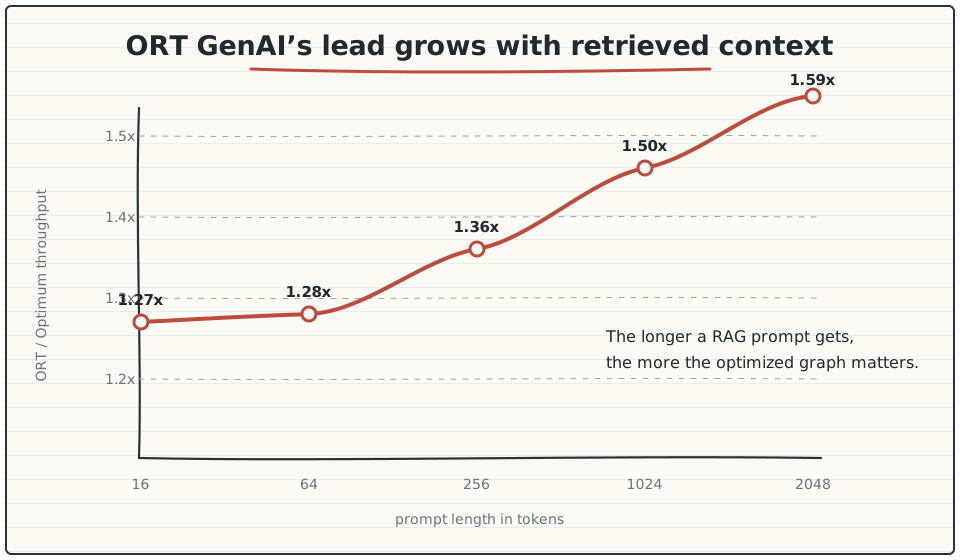
ONNX Runtime GenAI led at every prompt length. Its advantage grew with the prompt, which matters for RAG because retrieved context makes prompts longer.
| Prompt length | ORT GenAI | LlamaCPP | HF Optimum | ORT/LlamaCPP | ORT/Optimum |
|---|---|---|---|---|---|
| 16 | 137.59 | 109.47 | 108.35 | 1.26× | 1.27× |
| 64 | 136.82 | 110.26 | 107.14 | 1.24× | 1.28× |
| 256 | 134.45 | 109.42 | 105.76 | 1.23× | 1.36× |
| 1024 | 127.34 | 105.60 | 102.11 | 1.21× | 1.50× |
| 2048 | 122.62 | 102.00 | 99.35 | 1.20× | 1.59× |
Wall-clock latency (seconds)
Wall-clock latency is the metric tied directly to the 5-second requirement. ORT GenAI remained under that limit even with 2048-token prompts.
| Prompt length | ORT GenAI (s) | Optimum (s) | LlamaCPP (s) |
|---|---|---|---|
| 16 | 2.491 | 3.526 | 2.51 |
| 64 | 2.502 | 3.545 | 2.52 |
| 256 | 2.571 | 3.772 | 2.71 |
| 1024 | 2.790 | 4.049 | 3.12 |
| 2048 | 3.073 | 4.279 | 3.46 |
Optimum’s weaker graph optimization and lack of Phi-3 support add roughly a second of latency for long prompts. At 2048 prompt tokens, it took 4.279s compared with 3.073s for ORT GenAI. That is a 1.2-second gap, or approximately 39% slower, enough to determine whether the pipeline meets the budget.
Why ONNX Runtime GenAI is faster
The performance gap follows from how the engine prepares and runs the graph:
- ORT GenAI uses an optimized graph with fused attention and a managed KV cache. Per-token work remains low as the sequence grows, so its throughput advantage over Optimum increases from 1.20× at 16 tokens to 1.59× at 2048 tokens instead of narrowing.
- The Phi-3 ONNX build uses INT4 block quantization. Weight quantization reduces memory bandwidth, the bottleneck in autoregressive decoding, without the accuracy loss of naive INT8.
- ORT GenAI has first-class Phi-3 support. Optimum cannot optimize Phi-3 and falls back to a generic path, while the ORT GenAI builder emits a model tuned for this architecture.
LlamaCPP remains competitive on throughput but trails by approximately 20%. On Windows, it also requires custom builds that we did not want to maintain.
Windows vs Linux
ORT GenAI’s wall-clock throughput on Windows matched or exceeded Linux at every measured prompt length. In this benchmark, Windows did not impose the performance penalty we had assumed.
| Prompt length | Windows (tps) | Linux (tps) |
|---|---|---|
| 16 | 142.18 | 129.52 |
| 256 | 259.48 | 235.68 |
| 2048 | 932.03 | 892.12 |
Decision
ONNX Runtime GenAI had the highest throughput and lowest latency at every prompt length. It also fully optimizes Phi-3 ONNX models, which Optimum cannot do, and provides official Windows binaries without requiring a custom build. Unlike Triton, it does not depend on Docker. For offline, Windows-based SLM inference under these constraints, it is the practical default.
Part two connects the selected engine to a LangChain
RAG pipeline. It includes a custom BaseLLM and the model-building step that produces the optimized
ONNX graph.