
Artwork: Self-Portrait by Rembrandt. The Metropolitan Museum of Art · Public domain
Managed Identity on Logic App Consumption with Terraform
AI disclosure: This article was moderated by AI.
On a recent project, we needed an Azure Logic App Consumption workflow to connect securely to Azure Storage through Managed Identity. The deployment had to stay entirely in Terraform, with no hardcoded credentials. Terraform does not natively support Managed Identity API connections for Logic App Consumption workflows, so we had to work around that provider gap.
The problem
Managed Identity fits Logic App to Storage authentication because Azure handles the token exchange
and there are no secrets to rotate or leak. However, the azurerm provider has a
documented gap
that prevents it from directly configuring an
API connection
with Managed Identity for Consumption workflows.
We needed an IaC path that did not fall back to portal configuration.
The approach
The implementation uses two resources to cover what the native provider cannot express:
azapi_resourcecreates the API connection with Managed Identity authentication.azurerm_resource_group_template_deploymentuses an ARM template to deploy the Logic App with that connection wired in.
The deployment also includes the resource group, storage account, queue, and role assignment.
Compared with the alternatives, this is the only path that is both fully automated and credential free:
| Approach | Managed Identity? | Fully automated? | Notes |
|---|---|---|---|
| Portal / click-ops | Yes | No | Drifts from IaC; not reproducible |
azurerm_api_connection | No | Yes | No MI support for Consumption connections |
| Access keys in Terraform | Connection only | Yes | Secrets to store and rotate |
azapi_resource + ARM | Yes | Yes | No secrets; everything stays in Terraform |
Implementation
1. Create the API connection with Managed Identity
The connection uses parameterValueSet.name = "managedIdentityAuth" to enforce Managed Identity
authentication:
resource "azapi_resource" "create_api_connection" {
  type                      = "Microsoft.Web/connections@2016-06-01"
  name                      = "storage-queue-connection"
  location                  = azurerm_resource_group.rg.location
  parent_id                 = azurerm_resource_group.rg.id
  schema_validation_enabled = false

  body = jsonencode({
    properties = {
      displayName = "Queue"
      parameterValueSet = {
        name  = "managedIdentityAuth" # enforces Managed Identity on the connection
        value = {}
      }
      api = {
        name        = "azurequeues"
        displayName = "Azure Queues"
        id          = "/subscriptions/${data.azurerm_subscription.current.subscription_id}/providers/Microsoft.Web/locations/${azurerm_resource_group.rg.location}/managedApis/azurequeues"
      }
    }
  })
}
2. Deploy the Logic App through an ARM template
Terraform cannot express the complete Logic App body with a Managed Identity connection. The ARM template handles that part of the deployment. Two settings make the identity flow work end to end:
- The workflow declares
"identity": { "type": "SystemAssigned" }. - The
$connectionsparameter setsconnectionProperties.authentication.type = "ManagedServiceIdentity".
data "template_file" "workflow" {
  template = file(var.arm_file_path)
}

resource "azurerm_resource_group_template_deployment" "logic_app_workflow_deployment" {
  deployment_mode     = "Incremental"
  name                = "workflow_deployment"
  resource_group_name = azurerm_resource_group.rg.name
  parameters_content = jsonencode({
    logic_app_name           = var.logic_app_name
    location                 = var.location
    azurequeue_connection_id = "/subscriptions/${var.subscription_id}/resourceGroups/${azurerm_resource_group.rg.name}/providers/Microsoft.Web/connections/storage-queue-connection"
    managed_api_id           = "/subscriptions/${var.subscription_id}/providers/Microsoft.Web/locations/${azurerm_resource_group.rg.location}/managedApis/azurequeues"
  })
  template_content = data.template_file.workflow.template
}
3. Grant storage access to the identity
The Logic App’s system-assigned identity needs a role on the storage account. Queue writes require the Storage Queue Data Contributor role:
resource "azurerm_role_assignment" "logic_app_contributor" {
  scope                = azurerm_storage_account.storage.id
  role_definition_name = "Storage Queue Data Contributor"
  principal_id         = data.azurerm_logic_app_workflow.logic_app.identity[0].principal_id
}
4. Retrieve the callback URL (optional)
Because ARM deploys the trigger instead of a native Terraform resource, its callback URL is not
available as a Terraform output. An azapi_resource_action can retrieve it:
data "azapi_resource_action" "callback_url_data" {
  type        = "Microsoft.Logic/workflows/triggers@2019-05-01"
  action      = "listCallbackUrl"
  resource_id = "/subscriptions/${data.azurerm_subscription.current.subscription_id}/resourceGroups/${azurerm_resource_group.rg.name}/providers/Microsoft.Logic/workflows/${local.logic_app_name}/triggers/${local.trigger_name}"
}
Deployment details that matter
These details cost us time during implementation:
- Set
schema_validation_enabled = falseon theazapi_resource. The connection body does not match the provider’s strict schema, so validation otherwise rejects a validmanagedIdentityAuthconnection. - The role assignment depends on the workflow’s
principal_id, which exists only after the ARM deployment creates the system-assigned identity. Terraform’s dependency graph must sequence the resources in that order, or the principal will be null. - RBAC is eventually consistent. A new role assignment can take a minute or two to propagate, so
a Logic App run started immediately after
applymay return 403 before the grant takes effect. - The
$connectionskey in the ARM template (azurequeues-1) must match the name referenced by the action. If the names differ, the trigger silently fails to bind.
Result
When azurerm does not expose the required API surface, azapi_resource and an ARM template keep
the deployment in Terraform. The parameterValueSet = "managedIdentityAuth" setting switches the
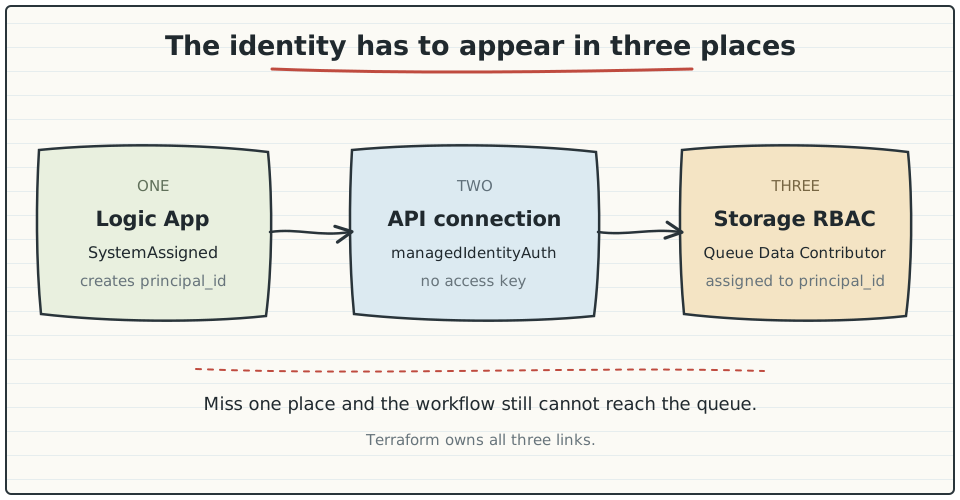
connection to Managed Identity. The same identity must then be wired into three places: the
workflow identity block, the connection’s authentication.type, and the RBAC role assignment.
This produces a scalable, credential-free deployment with no stored secrets or portal drift.
Note: the article’s illustration was generated with Bing Image Creator.