
Artwork: Mäda Primavesi by Gustav Klimt. The Metropolitan Museum of Art · Public domain
Hybrid Agent Evaluation: Custom Judges + Azure Foundry Evaluators
AI disclosure: This article was moderated by AI.
Evaluating a speech-to-speech debriefing agent involves two separate questions. Did the conversation stay grounded in the facts of this job? Did the agent complete the task, follow the protocol, and call tools correctly? One evaluator does not answer both questions well. We use custom LLM judges for domain quality and Azure Foundry’s built-in evaluators for agent behavior.
Two dimensions, two kinds of evaluator
- Domain quality is specific to the job. The evaluator must check whether the agent recorded the right parts, matched the test results, and chose the correct follow-up. A generic evaluator cannot verify facts it has never seen.
- Agent behavior covers general measures such as task completion, task adherence, and tool-call accuracy. Microsoft has already tuned and validated evaluators for these dimensions.
The options we weighed
| Option | Verdict |
|---|---|
| A. Custom judges only | Full control, but we’d have to rebuild and validate agent-behavior metrics from scratch |
| B. Foundry evaluators only | Standardized behavior metrics, but no scenario-fact groundedness and no C# SDK |
| C. Hybrid (custom + Foundry via REST) | Best coverage while staying in C# |
| D. Python sidecar for the Foundry SDK | Native SDK, but adds Python to a .NET 10 build |
We chose option C because the solution runs on .NET 10. As of early 2026, the
Azure.AI.Projects C# package does not expose the evaluation API surface. A Python sidecar would
provide the native SDK, but it would also add a cross-language dependency and the related CI/CD
work to a .NET build.
How the split works
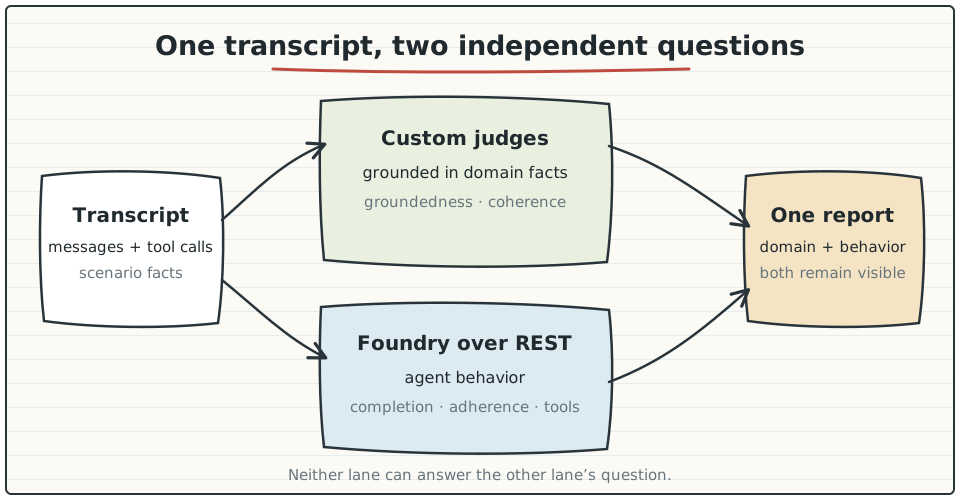
Custom evaluators handle domain quality:
GroundednessEvaluatorvalidates responses against scenario-specific facts.CoherenceEvaluatorassesses logical flow and consistency.
Foundry evaluators handle agent behavior over REST:
- Task Completion checks whether the agent finished the debrief.
- Task Adherence checks whether it followed the protocol.
- Tool Call Accuracy checks whether it invoked tools correctly.
Foundry includes nine built-in agent evaluators. They cover system-level outcomes and process-level tool use:
| Category | Evaluator | Output |
|---|---|---|
| System | Task Completion | Pass/Fail |
| System | Task Adherence | Pass/Fail |
| System | Intent Resolution | 1–5 → Pass/Fail |
| System | Task Navigation Efficiency | Pass/Fail + F1 |
| Process | Tool Call Accuracy | 1–5 → Pass/Fail |
| Process | Tool Selection | Pass/Fail |
| Process | Tool Input Accuracy | Pass/Fail |
| Process | Tool Output Utilization | Pass/Fail |
| Process | Tool Call Success | Pass/Fail |
Mapping the transcript
Foundry evaluators expect the OpenAI message schema. Our TranscriptDocument already captures
roles, content, and tool calls, which makes the mapping mechanical:
{
  "query": [
    {"role": "user", "content": "I replaced the roller guides..."}
  ],
  "response": [
    {"role": "assistant", "content": [
      {"type": "tool_call", "name": "save_part", "arguments": {"partNumber": "RG-2450-A"}}
    ]},
    {"role": "tool", "content": [{"type": "tool_result", "tool_result": {"status": "saved"}}]},
    {"role": "assistant", "content": "Got it, I've recorded the roller guide replacement."}
  ]
}
The client authenticates to the OpenAI Evals REST API with DefaultAzureCredential, then follows
a create, run, and poll lifecycle:
POST /openai/evalscreates the evaluation withazure_ai_evaluatortesting criteria (evaluator_name,data_mapping,initialization_parameters).POST /openai/evals/{eval_id}/runsexecutes a run.GET /openai/evals/{eval_id}/runs/{run_id}polls for completion.GET .../output_itemsretrieves per-row scores, labels, and reasoning.
An EvaluationRunner calls both sets of evaluators in one pipeline. Each run produces
scenario-fact groundedness results alongside standardized behavior metrics.
The C# client is a thin wrapper around the lifecycle. It authenticates, creates the evaluation, starts a run, and polls until the run leaves the queued or in-progress state:
var cred = new DefaultAzureCredential();
var client = new AzureFoundryEvaluatorClient(endpoint, cred);

// 1. Create the eval with typed azure_ai_evaluator criteria
var evalId = await client.CreateEvalAsync(new AzureAiEvaluator {
    EvaluatorName = "builtin.tool_call_accuracy",
    DataMapping = new { query = "{{item.query}}", response = "{{item.response}}",
                        tool_definitions = "{{item.tool_definitions}}" },
});

// 2. Kick off a run over the transcript data source
var runId = await client.CreateRunAsync(evalId, transcripts);

// 3. Poll to completion
EvalRun run;
do {
    await Task.Delay(TimeSpan.FromSeconds(5));
    run = await client.GetRunAsync(evalId, runId);
} while (run.Status is "queued" or "in_progress");

var rows = await client.GetOutputItemsAsync(evalId, runId);   // scores, labels, reasoning
The combined report puts domain results from the custom judges next to behavior results from Foundry:
| Evaluator | Source | Result | Reasoning (excerpt) |
|---|---|---|---|
| Groundedness | Custom | 4.6 / 5 | “Parts and test results match scenario facts” |
| Coherence | Custom | Pass | “Logical flow, no contradictions” |
| Task Completion | Foundry | Pass | “Debrief closed with all fields captured” |
| Task Adherence | Foundry | Pass | “Followed the 8-step protocol” |
| Tool Call Accuracy | Foundry | 5 / 5 → Pass | “save_part args well-formed” |
Trade-offs
The hybrid approach adds maintenance work:
- You maintain two evaluation systems: custom judge prompts and a REST integration.
- The Foundry REST API is less mature than the Python SDK and has undocumented edges.
- The REST client needs authentication, polling, and error handling.
We accepted that overhead because the alternatives offered weaker coverage or added a Python dependency to a .NET solution. The agent evaluation extension sends the results to Azure DevOps pipeline summaries, keeping the process in CI.
What this design gives us
Use custom judges for facts you own and standardized evaluators for general agent behavior. The C#-only requirement made REST the practical integration despite its rough edges. Running both sets of evaluators through one pipeline gives each run domain and behavior signals in the same report.
The next article explains why we replaced 1-to-5 judge scales with binary judges and outcome scoring.